
How Qarbine Helps Development Teams
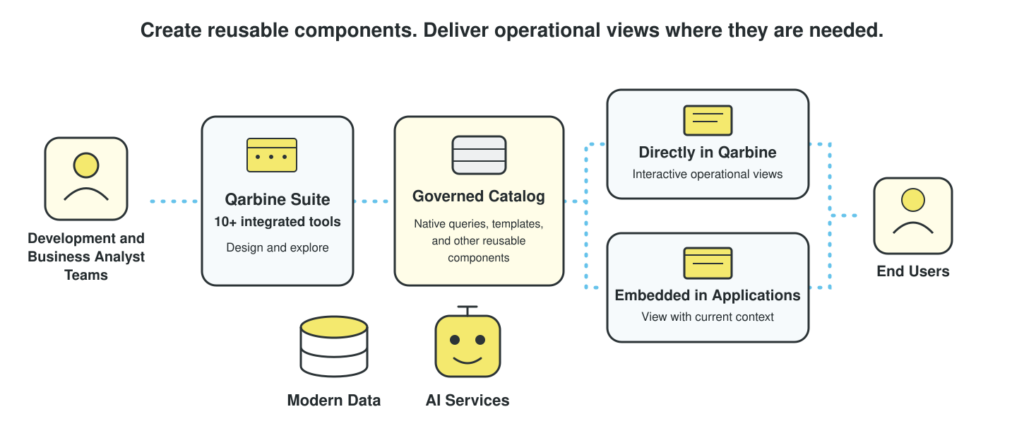
Qarbine’s integrated tools help developers inspect data structures, examine sample data, and test native queries during application development. Built-in DBA-oriented reports are ready for you on day one. Reusable templates turn that work into useful views for the team, reducing the effort of repeatedly building one-off tools to understand the data.
Applications often need detailed operational pages after the core workflows are built. Qarbine templates can supply interactive operational views with drill-down, calculations, graphics, export, and print. Teams can deliver these experiences without hand-building every page and its surrounding information functions.
An application can pass a business object or selected values into an embedded Qarbine view, so users begin with the relevant context. Qarbine’s JavaScript SDK supports interaction between the view and its containing application, including actions that return users to the application. Templates can also call existing JavaScript functions to reuse tested business behavior.
Developers and data specialists can define optimized, governed queries using each source’s native capabilities. Qarbine stores those queries as shared catalog components that teams can use in multiple templates and operational views. When data access requirements change, specialists can update the query component without rebuilding every view that uses it.
Qarbine uses each vendor’s native Node.js client library, giving developers access to each database’s native queries, data structures, and features. SQL-centric connectors expose only a subset of those capabilities and flatten complex business data into tables. Qarbine lets teams work with the source in its natural form, then combine the results with vector search, RAG, and AI services in operational views.
Vector search can locate relevant data for an operational view. With Qarbine’s Template Designer, teams define how the underlying engine processes complex data, performs calculations such as percent-of-total analysis, and produces publication-quality presentations. A template can also invoke RAG and inference during rendering based on the current page content, adding context specific to what the user is viewing.